19 Computer Use & Embodiment
“The body is our general medium for having a world.”
— Maurice Merleau-Ponty, Phenomenology of Perception
After this chapter you will understand agents that operate graphical interfaces, browsers, and operating systems — and their current reliability limits.
19.1 When there is no API
Everything we have built so far assumes the world offers the agent clean handles to grab: tools with JSON schemas, APIs that return structured data, the tidy function calls of Chapter 10. But most of the software on earth was built for humans, not agents, and offers no such handle — a legacy desktop application, a website with no public API, an internal tool locked behind a login. What does an agent do when there is no API to call? This chapter is about the frontier answer: it does what a person does — it looks at the screen and uses the mouse and keyboard.
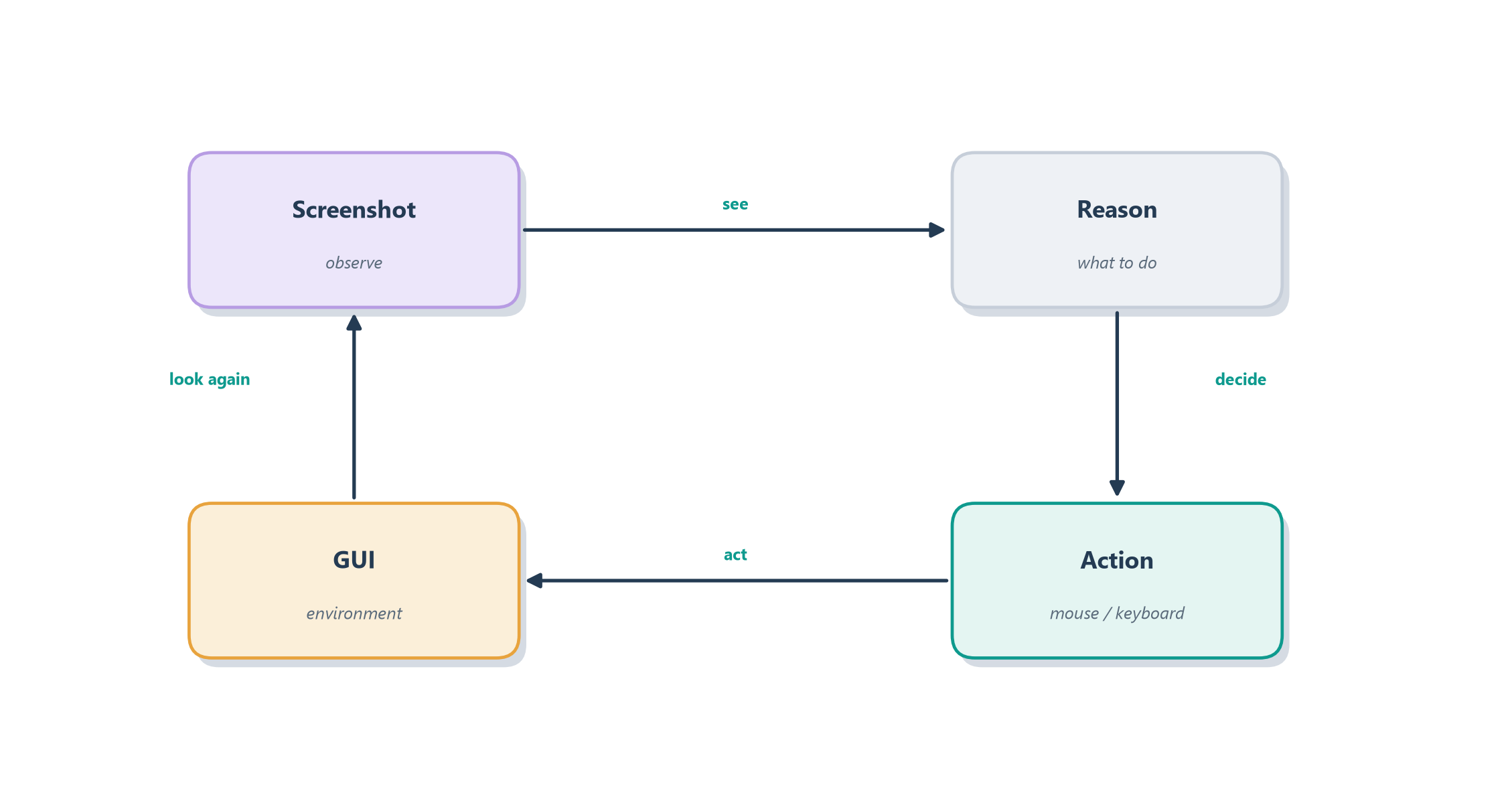
The everyday version of this leap is the difference between two ways of getting a colleague to fill out a form. The first is to hand them a clean data feed they can import automatically — the API way, fast and reliable. The second is to sit them in front of the screen and say “click here, type this, scroll down, press submit” — slower, clumsier, but universal, because anything a human can operate, they can operate this way. A computer-use agent takes the second path: it perceives the screen as an image, decides where to click and what to type, and acts through simulated mouse and keyboard events, closing the loop by looking at the screen again to see what happened. Figure 19.1 draws that perceive–decide–act loop.
It is worth making that abstraction concrete with a system we already know. Every tool the Ledgerly support agent used, get_invoice, read_subscription, issue_refund, was a clean function call, and only because the billing platform happened to expose an API. Swap that platform for a legacy desktop billing application, or a vendor portal with no public API, and the very same refund Ledgerly issued in a single call now has to be clicked through a screen that was built for a human operator. The goal is unchanged; only the handle has vanished. Computer use is the move an agent makes when the handle is gone, which is exactly the situation many real support teams still work in.
Notice that this is not a new kind of agent but our familiar reason–act loop from Section 7.5 with new eyes and hands: the observation is now a picture of a screen rather than a tool’s text output, and the action is a click rather than a function call. That reframing is what makes computer use so tantalizing — in principle it gives an agent access to all software at once, no integration required. It is also, as we will see, what makes it so hard. First, though, let us look at how such an agent actually perceives and acts.
19.2 How a computer-use agent works
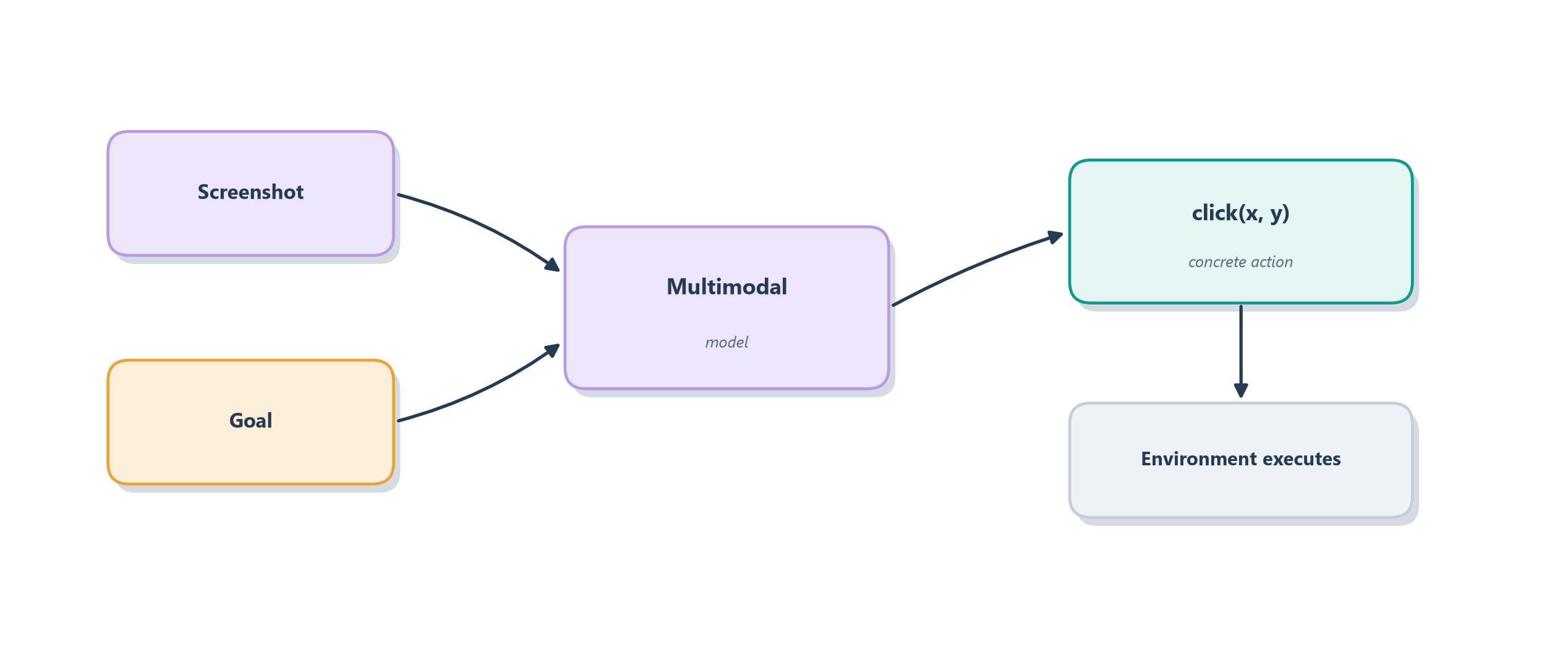
To turn “use the screen like a person” into a running system, two things have to change from the agents we have built. The model has to see — it must be multimodal, able to take an image of the screen as input — and its action space has to become the vocabulary of a human at a keyboard. That vocabulary is small and concrete: click at a screen position, type some text, scroll, press a key, drag. Each turn, the agent is shown a screenshot and asked to choose one of those actions; the system executes it against the real interface and hands back the next screenshot. This is exactly why the computer-use capability shows up as a hosted tool in the Responses API we met in Section 13.3 — the provider wires the screenshot-in, action-out loop so you can drive it like any other tool [1]. Figure 19.2 shows the anatomy of a single step.
Two arenas matter in practice, and they differ in how much of the machine the agent can touch. The narrower, safer one is the browser: an agent that drives a web browser can navigate, fill forms, and click through sites, which already covers an enormous share of real work since so much software now lives on the web. The broader, riskier one is full operating-system control: an agent that can move the mouse and type anywhere on a desktop can, in principle, operate any application — spreadsheets, legacy tools, file managers — but with the far larger blast radius we worried about in Chapter 17, since a stray click could touch anything on the machine. The hardest technical problem lurking inside both is grounding: translating a high-level intention like “click the Submit button” into the exact pixel coordinates where that button happens to sit, on this screen, at this resolution, in this theme — a mapping from meaning to location that humans do effortlessly and models still find genuinely difficult.
That grounding difficulty is not a footnote; it is the crux of why this frontier, for all its promise, is not yet a solved technology. Which brings us to an honest accounting of how well these agents actually work today.
19.3 How well it works today
It would be easy, watching a polished demo of an agent booking a flight by clicking through a website, to conclude that computer use is a solved problem. It is not, and being honest about the gap between demo and reliability is part of thinking clearly about this frontier. The sober truth is that today’s computer-use agents are impressive in narrow, familiar conditions and fragile almost everywhere else.
The evidence comes from benchmarks built to measure exactly this. OSWorld, for instance, puts agents in real computer environments and asks them to complete genuine open-ended tasks across actual applications — and its headline finding is a wide chasm between people and machines: humans complete most of the tasks, while the best agents succeed on only a small fraction of them [2]. That gap is not an accident of one benchmark; it reflects a few stubborn difficulties. The grounding problem from the last section means a small visual change — a moved button, a new theme, an unexpected pop-up — can derail an agent that would have breezed through the familiar layout. And because a real task is a long sequence of clicks, the compounding-error problem from Chapter 8 bites hard: even a high per-step success rate, raised to the power of dozens of steps, decays into a low chance of finishing the whole task without a single fatal misstep. The right mental model is not a reliable employee but a talented, easily-distracted intern who dazzles on the happy path and gets hopelessly lost the moment the screen looks unfamiliar.
The practical consequence follows directly from the safety discipline of Chapter 17: for anything consequential, a computer-use agent needs a human in the loop, because an agent clicking autonomously through real software with a low whole-task success rate is a recipe for expensive mistakes. This is a frontier in the truest sense — advancing quickly, genuinely useful in bounded settings, and not yet trustworthy enough to leave unattended. And yet the ambition behind it points somewhere even larger: if an agent can act in the world of screens, what about the world beyond them?
19.4 From screens to worlds
A computer-use agent already lives a kind of embodied life: it has senses (the screen) and a body (mouse and keyboard) and it acts in a world (the software) by perceiving and moving. Loosen the definition of “world” and the same idea stretches naturally toward embodiment in the fuller sense — agents that perceive and act in rich, open-ended environments, whether a 3D simulation or, at the far edge, a physical robot. The through-line is that the reason–act loop does not care whether the observation is a screenshot, a game frame, or a camera feed, nor whether the action is a click or a motor command.
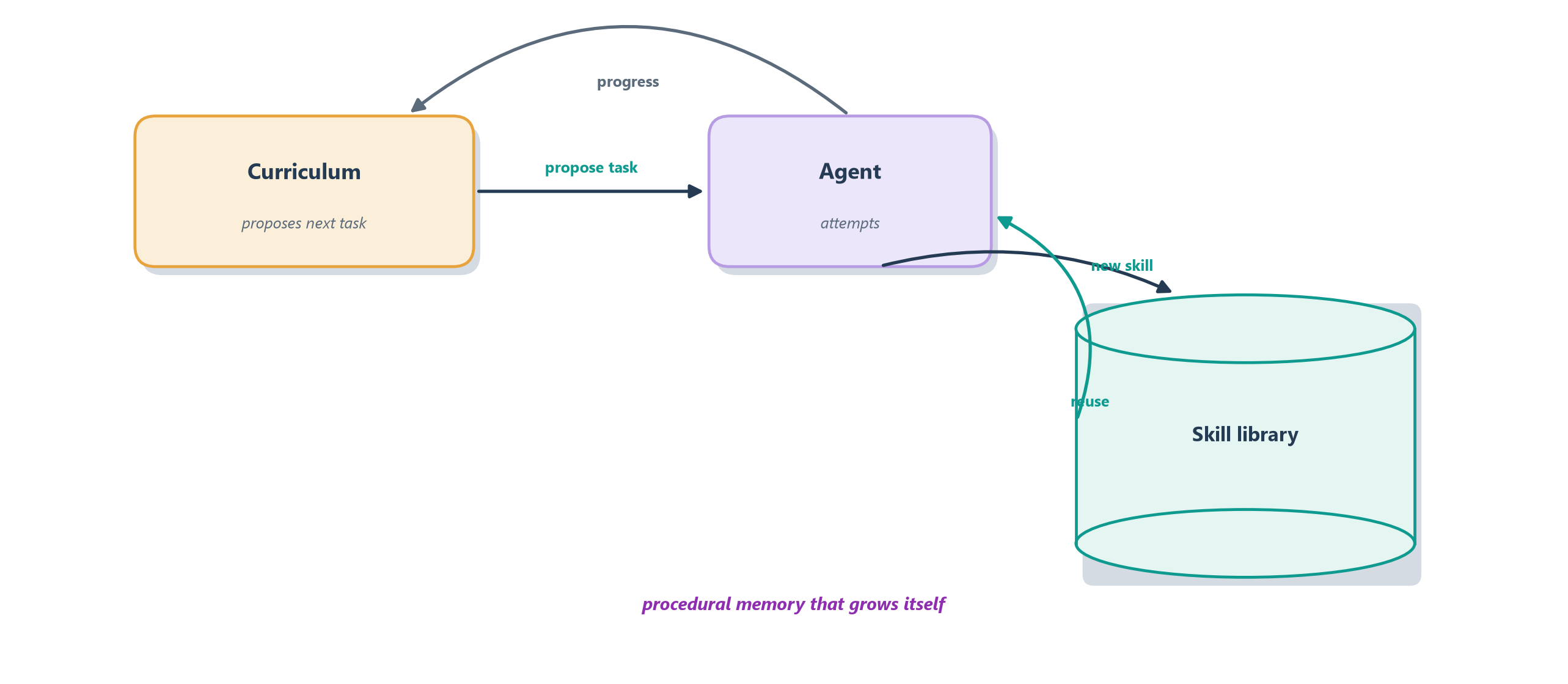
The landmark demonstration is Voyager, an LLM-driven agent set loose in the open world of Minecraft with no scripted goal beyond “explore and get better” [3]. What makes Voyager illuminating is not that it plays a game but how it learns to. It runs an automatic curriculum, proposing its own next challenge based on what it can already do, so it bootstraps from chopping wood toward crafting tools and mining deep ores. And when it discovers how to do something new, it writes that skill as a reusable piece of code and files it in a growing skill library — which is nothing other than the procedural memory of Chapter 11, accumulated autonomously. Later, facing a harder task, it retrieves and composes those stored skills rather than relearning from scratch. Figure 19.3 sketches this open-ended learning loop.
Voyager matters to this book because it shows the pieces we built for practical agents — a reason–act loop, growing memory, composed skills — turning into something that looks like open-ended learning, an agent that gets more capable the longer it runs. That is a genuine glimpse of the frontier, and it also surfaces the deep questions embodiment raises: how agents ground language in perception, how they acquire skills without a teacher, and how far the digital successes transfer to the unforgiving physical world. Those questions do not have settled answers, which makes them the perfect bridge to the final chapter — a clear-eyed survey of what agents still cannot do, and where the field goes next.
19.5 Summary
This chapter followed agents past the tidy world of APIs into the messier one built for humans — screens, browsers, and eventually open worlds — and kept an honest eye on how well they cope there.
- When there is no API, the agent uses the screen like a person. It perceives a screenshot, decides on a click or keystroke, and acts — the reason–act loop of Section 7.5 with new eyes and hands.
- Computer use needs a multimodal model and a human action space, and appears as a hosted tool in APIs like the Responses API [1]. It works in the browser (narrower, safer) and at the OS level (broader, riskier).
- Grounding is the crux — mapping “click Submit” to exact pixel coordinates is easy for people and hard for models, and small visual changes break brittle agents.
- Reliability today is sobering. Benchmarks like OSWorld show a wide human–agent gap, worsened by compounding errors over long click sequences, so consequential tasks still need human oversight [2].
- The same loop stretches to embodiment. Voyager’s open-ended learning — an automatic curriculum plus a self-built skill library — shows practical agent pieces turning into continual learning [3].
Computer use and embodiment are frontiers precisely because they are thrilling in demos and unreliable in the wild — a fitting note on which to step all the way back. The final chapter widens the lens from this one frontier to the whole horizon: the capabilities agents still lack, the open research problems, and the honest questions about where this technology is heading. That survey is Chapter 20.
19.6 Exercises
- Same loop, new senses. Explain how a computer-use agent is the reason–act loop in disguise, identifying what plays the role of “observation” and “action.”
- Browser or OS? Give one task you would trust to a browser-only agent and one that would require full OS control, and explain the difference in blast radius.
- Why grounding is hard. Describe the grounding problem in your own words and give an example of a small screen change that would break an agent relying on it.
- Do the compounding math. If an agent succeeds at each step with 95% reliability, explain qualitatively why a 40-step task is likely to fail, and connect this to Chapter 8.
- Trace Voyager’s growth. Explain how the skill library lets Voyager get better over time, and which type of memory from Chapter 11 it corresponds to.