13 The OpenAI Agents SDK
“Simple things should be simple, complex things should be possible.”
— Alan Kay
After this chapter you will be able to build single- and multi-agent systems with the OpenAI Agents SDK using agents, handoffs, guardrails, and tracing.
13.1 A smaller kit of parts
The last chapter handed you a full control panel. With LangGraph you draw every node and every edge yourself, and in exchange you get complete authority over how the agent moves: durability, time travel, an interrupt wherever you want one. That explicitness is a feature, but it is also a cost: for many everyday agents, drawing the whole state machine by hand is more ceremony than the problem deserves. So before we leave single- and small-team agents behind, it is worth meeting a framework built on the opposite instinct, one that hands you a handful of parts and lets plain Python do the wiring. This is the “second, lighter-weight framework” the last chapter promised: the OpenAI Agents SDK [1].
The everyday version of the contrast is a new manager choosing how to run a team. One manager writes a detailed flowchart pinned to the wall (first this person does X, then if the result looks like Y, that person does Z) and the team follows the chart. That is the LangGraph style. The other manager does something simpler: she hires a few capable specialists, writes each of them a short job description, and adds one standing rule: “if a request isn’t your area, hand it to the colleague whose area it is.” She does not draw a chart at all; the routing happens because each person knows their job and knows who to pass work to. The Agents SDK is that second manager. You describe a few agents and let them delegate among themselves, and the framework quietly runs the loop underneath.
Figure 13.1 shows that delegation instinct in its smallest form: a front-desk agent that either answers a request itself or hands it to the right specialist.
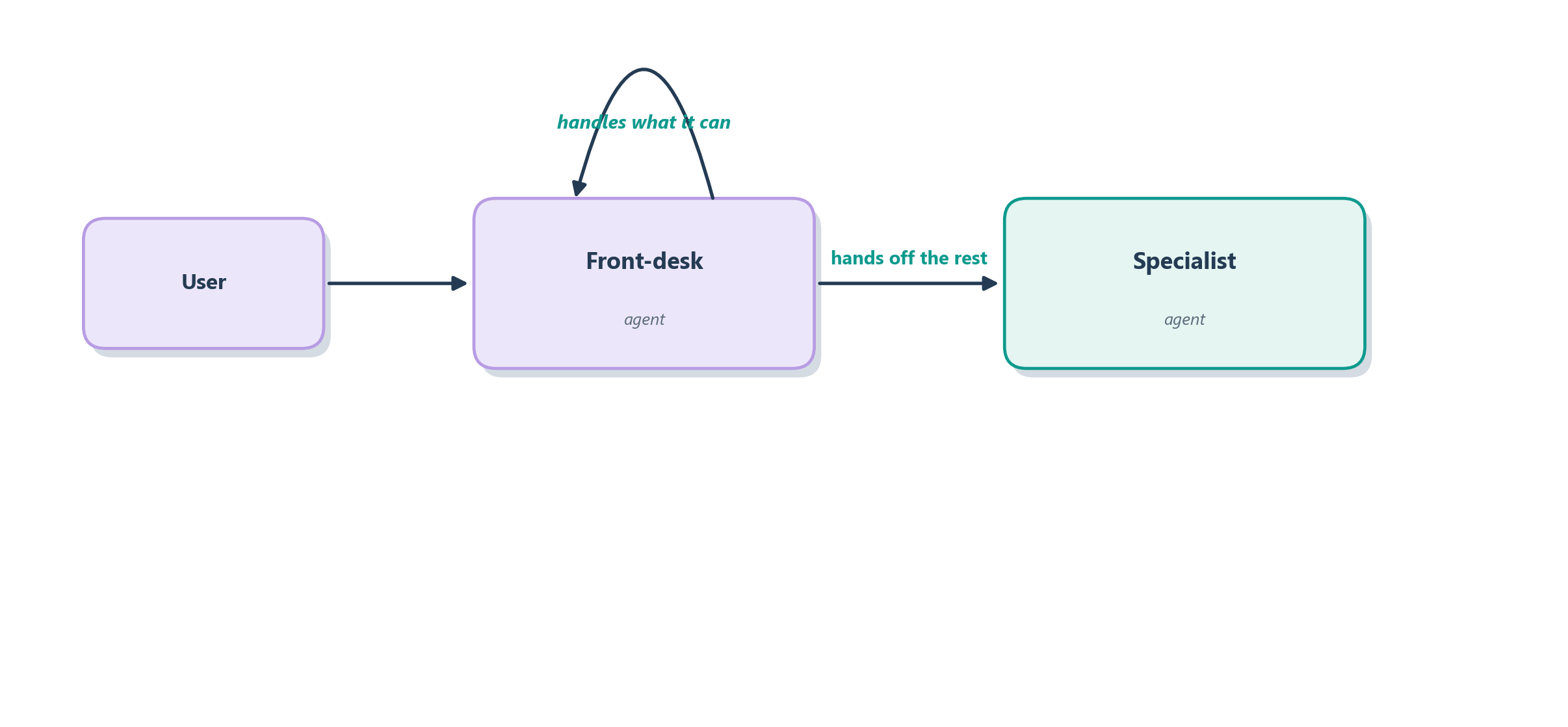
Notice what is missing from that picture compared with a LangGraph diagram: there is no explicit edge you had to declare, no shared-state object you had to design, no conditional-edge function you had to write. The front desk simply knows it can hand off, and the framework turns that into the right sequence of model calls. That is the trade the SDK makes: you give up some of LangGraph’s fine-grained control and get, in return, a much smaller kit of parts to learn. The rest of this chapter takes that kit apart piece by piece, starting with the three primitives everything else is built from.
13.2 The core primitives
The SDK’s whole design philosophy is stated in two lines in its own documentation: enough features to be worth using, but few enough primitives to make it quick to learn [1]. Where LangGraph gives you a general graph and lets you build anything, the Agents SDK gives you a very small vocabulary and trusts plain Python to combine the words. There are really just three nouns to learn (agents, handoffs, and guardrails) plus a verb, the runner, that ties them together.
Think of it like staffing a small office. An agent is a single employee: a language model given a name, a set of written instructions (its job description), and a drawer of tools it is allowed to use: the function tools and MCP servers from Chapter 10. A handoff is the office rule for passing work along: one agent can transfer a conversation to another agent better suited to it, exactly the front-desk-to-specialist move from the last section. A guardrail is the office’s quality-and-safety check: a fast validation that runs alongside the agent on its inputs or outputs and can halt the run the moment something looks wrong: an off-topic request, a policy violation, a malformed answer. And the runner is the office manager who actually keeps things moving: you hand it an agent and an input, and it runs the loop we have described since Chapter 7 (call the model, execute any tool the model asked for, feed the result back, repeat) until the agent produces a final answer. Figure 13.2 shows how the four fit together around a single run.
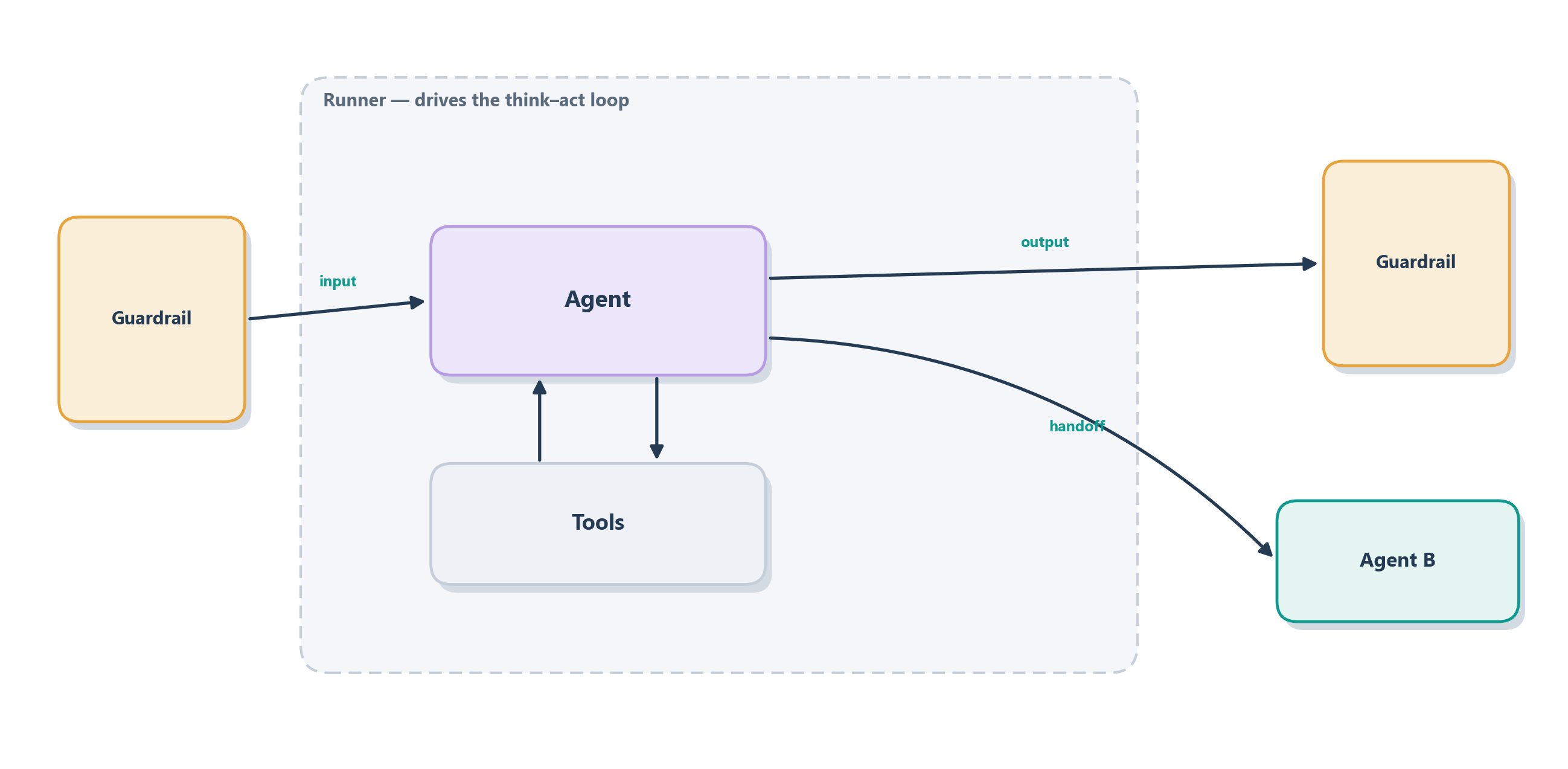
The reason this small vocabulary goes a long way is that the primitives compose through ordinary Python rather than through a special orchestration language. Because an agent is just an object, you can put a list of possible handoff targets on it, wrap a plain function as one of its tools, or even hand one agent to another as a tool so the caller stays in control, all with the language features you already know, no new abstraction to learn. That is the deliberate difference in feel from LangGraph: instead of declaring a graph up front and then running it, you configure a few agents and let the runner discover the path at execution time. The loop that discovers that path leans on one piece of OpenAI infrastructure we should look at directly before we build anything: the Responses API underneath.
13.3 The Responses API underneath
Every framework sits on top of something lower. LangGraph sits on top of your own model calls; the Agents SDK sits on top of OpenAI’s Responses API, and it is worth understanding that layer because it explains where some of the SDK’s power comes from without any extra code on your part. If the runner is the office manager, the Responses API is the phone system and filing cabinet the whole office runs on: the primitive that actually places a call to the model and keeps the paperwork.
The Responses API is OpenAI’s newer, agent-oriented way of talking to a model, and it differs from the older Chat Completions endpoint in a way that matters for agents. Chat Completions is essentially stateless and text-in, text-out: you send the whole message history every time and get one reply. The Responses API is built for multi-step work: it can carry state, and, most usefully, it exposes a set of hosted tools that run on OpenAI’s side rather than in your process. Web search, file search over your uploaded documents, and computer use (the screen-clicking capability we will meet in Chapter 19) are all available as built-in tools the model can invoke through the same mechanism as your own functions. Figure 13.3 shows the layering: your agents sit on the SDK, the SDK sits on the Responses API, and the API brokers both the model and its hosted tools.
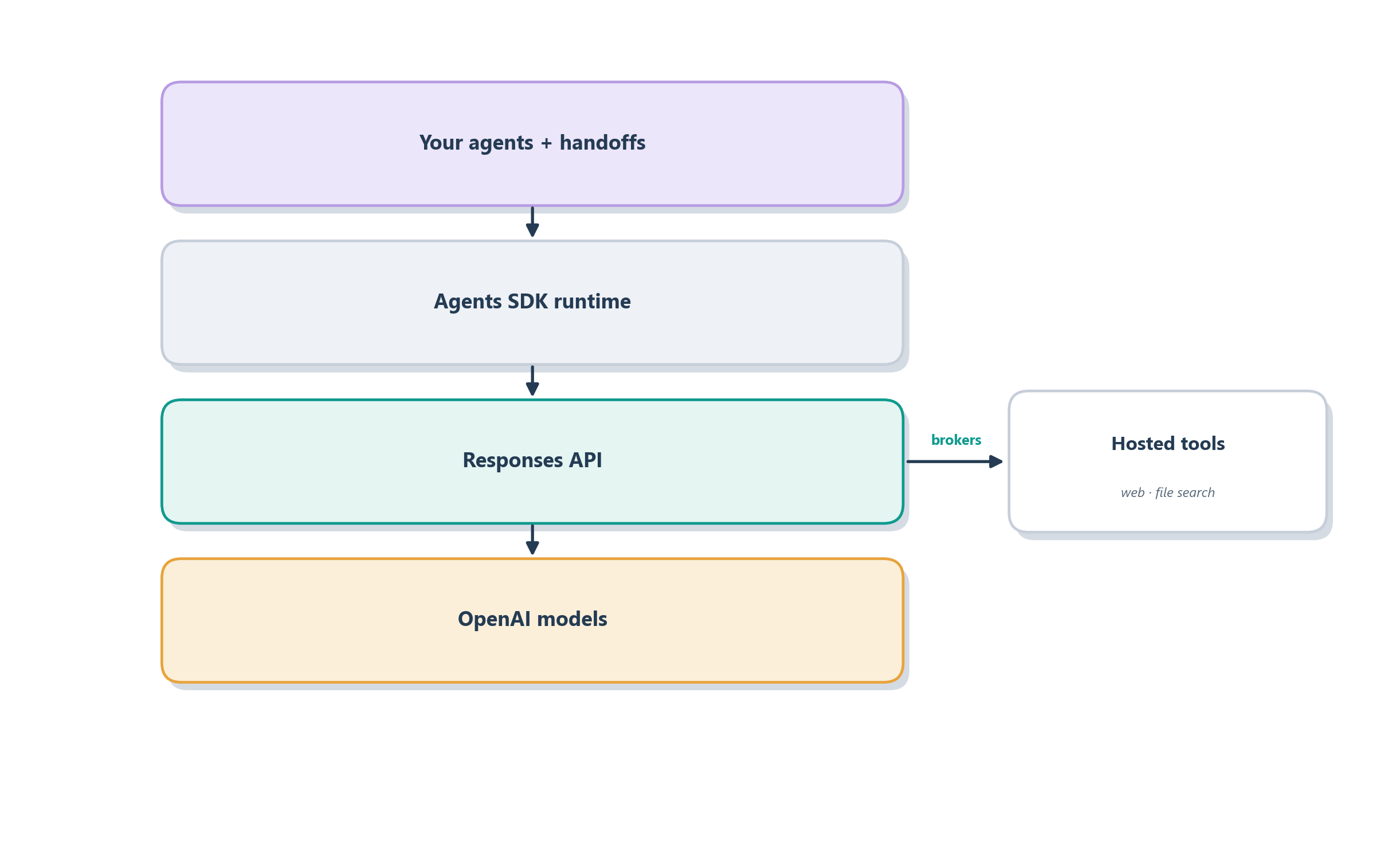
This layering also frames an honest choice the SDK’s own documentation is candid about: you do not always need the framework. If your task is short-lived (really just return the model’s response, maybe with one tool) you can call the Responses API directly and own the loop yourself, which is the same restraint we counseled at the end of the last chapter. You reach for the SDK when you want the runtime to manage things for you: turns, tool execution, guardrails running in parallel, handoffs between agents, and memory across turns through its sessions layer. And because the runtime records each of those steps, you also get tracing for free: a structured, replayable log of every model call, tool call, and handoff, which becomes the raw material for the debugging and evaluation we take up in Part 4.
The Responses API and the Agents SDK are recent additions, and provider APIs evolve quickly. Treat the exact endpoints, hosted tools, and method names here as a snapshot of the design rather than a frozen contract. Before you build on them, check the current OpenAI documentation for the latest feature set, pricing, and limits. The shape of the ideas, a managed runner, hosted tools, and a contract on each primitive, is what will endure.
13.3.1 Which layer do you actually need?
That choice is really a three-way one, because the last chapter gave you a third option. Below the SDK sits the raw Responses API, and above it sits LangGraph’s explicit graph. The three form a ladder of control, and the guiding rule is to climb no higher than your problem needs: reach for the lowest layer that still gives you enough control, and stop there. Table 13.1 lays the three side by side.
| Layer | Reach for it when | Avoid it when |
|---|---|---|
| Responses API directly | The work is short-lived: one model call plus a tool or two, with your own code owning what little logic there is. | You need handoffs between specialists, guardrails running in parallel, sessions, or built-in tracing. |
| OpenAI Agents SDK | You want lightweight, code-first agents with tools, handoffs, guardrails, sessions, and tracing, without hand-drawing the control flow. | You need explicit control over every branch, loop, pause, and resume. |
| LangGraph | You need an explicit graph: named state, nodes, conditional edges, checkpoints, interrupts, and durable replay. | The task is simple enough that a full state machine is just ceremony. |
Read the table as a warning in both directions. Reaching too low means rebuilding handoffs, memory, and tracing by hand that the SDK would have given you. Reaching too high means drawing a full LangGraph state machine for a job that a few agents and a handoff would have handled. The SDK is the comfortable middle rung, and choosing it is choosing a lighter set of parts. But lighter does not mean looser, and the next section explains where the design discipline goes instead.
13.4 Lightweight does not mean loose
It is tempting to read “smaller vocabulary” as “less to get right,” and that is the one misunderstanding this chapter most wants to head off. The SDK removes orchestration surface area, not design responsibility. In LangGraph the discipline is visible: it lives in the nodes, edges, and state you draw by hand, so a reviewer can see the control flow on the page. In the Agents SDK that same discipline does not disappear; it moves inside the primitives, into the words you write on each agent, tool, handoff, and guardrail.
The everyday version is the small office again. The manager who pins a detailed flowchart to the wall can hire loosely, because the chart carries the coordination. The manager who hires a few specialists and lets them pass work among themselves has no chart to lean on, so each person’s job description has to be exact: what is mine, what is not, who I pass things to, and when I must stop and check with someone. Fewer rules on the wall means each person’s brief must be sharper. In the SDK, those briefs are contracts, and there are four of them worth naming. Table 13.2 gathers them.
| Primitive | What it owns | Where it goes wrong | The contract to make explicit |
|---|---|---|---|
| Agent | Its job, its tools, its output shape. | Scope creep: a vague “help with support” agent that answers everything and is accountable for nothing. | What it does and does not handle, which tools it may use, and when to answer, ask, or hand off. |
| Tool | One external capability. | The model calls the wrong tool, or a state-changing tool at the wrong moment. | What it does, its arguments, what it returns, whether it has side effects, and when not to call it. |
| Handoff | The transfer of responsibility. | Control lands on the wrong specialist, or arrives stripped of the context it needed. | When to transfer, to whom, with what context, and who owns the answer afterward. |
| Guardrail | Validation and stopping. | A check that is too vague to fire, or missing exactly where risk is highest. | What condition it tests, and whether a violation should block, fail, pause, or escalate. |
These briefs stay abstract until a vague one bites. Take the guardrail row. A guardrail written as “block refunds over $500” looks airtight until the model phrases the same action as “issue a $500 credit” and slips underneath it, and an output guardrail told to “redact customer PII” does nothing useful until someone names which fields count: the phone number, the email, or the account number. A contract is only as strong as its most easily reworded clause.
Two of these contracts deserve a closer look because they are where lightweight designs most often turn loose. Because the SDK hides the control flow that LangGraph would have made explicit, an agent’s instructions stop being mere tone and become load-bearing: the sentence “you handle refunds and nothing else, and you hand billing questions back to triage” is the routing logic that a graph would have drawn as an edge. In the same way, a tool’s description is not developer documentation the model happens to ignore; it is part of the control surface, because the model reads it to decide whether and when to call the tool [2]. Get those words vague and the lightness curdles into unpredictability. The next two subsections take the two contracts that most often get conflated with something simpler than they are.
13.4.1 Handoff or agent-as-tool?
The first easy confusion is between two ways one agent can involve another, and telling them apart is probably the single most useful distinction in this chapter. Under the hood both look like the model calling a tool, but they mean opposite things about who is in charge afterward [2]. A handoff transfers control: the receiving specialist takes over the conversation and owns the final answer, and the original agent steps out of the way. Using one agent as a tool does the opposite: the caller consults a specialist for one bounded answer and then keeps ownership, writing the final reply itself. Figure 13.4 sets the two side by side.
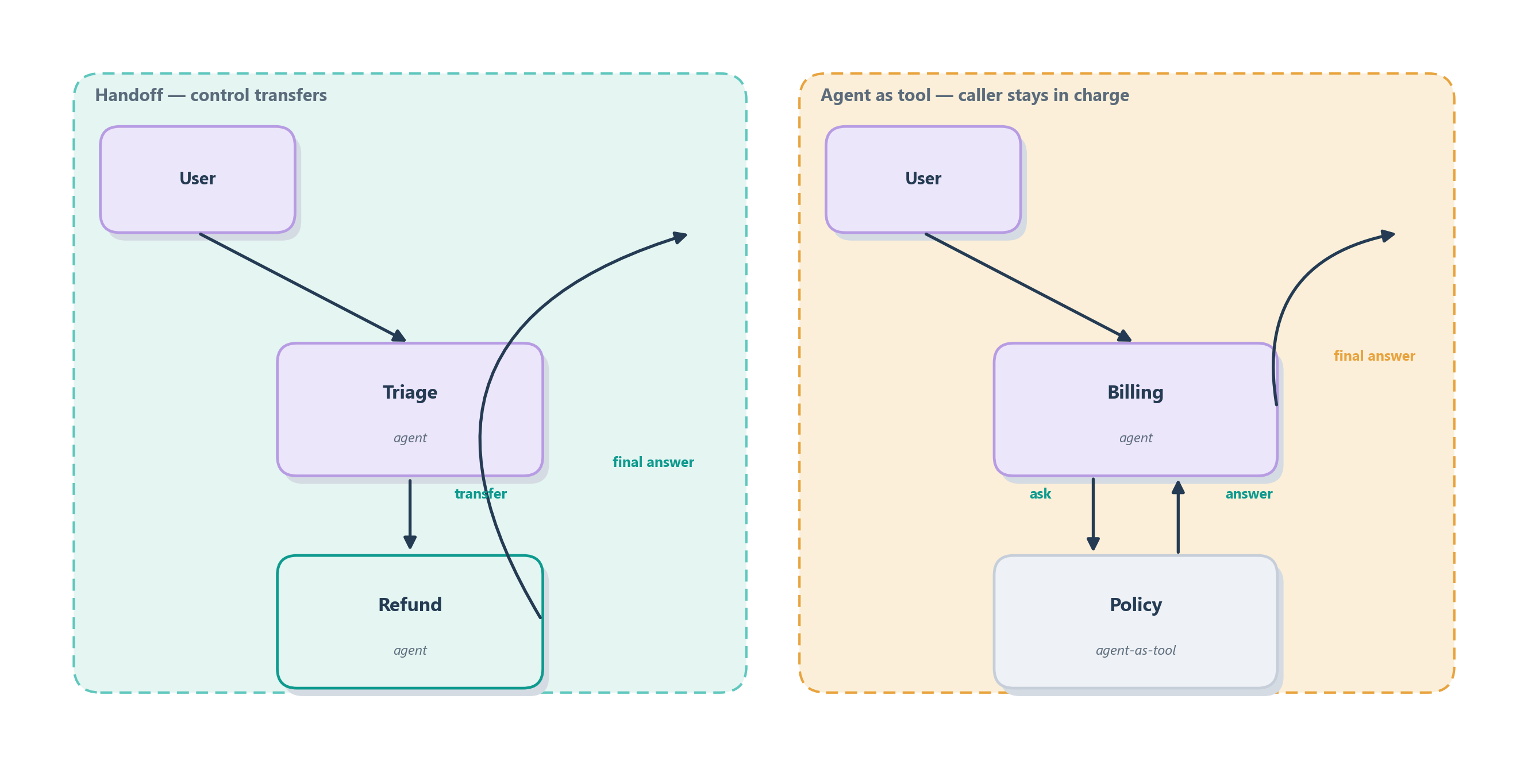
The choice turns on a single question: should the other agent take over, or just advise? Table 13.3 makes the split concrete on our running Ledgerly support desk.
| Pattern | Who owns the final answer | Best when | Ledgerly example |
|---|---|---|---|
| Handoff | The receiving specialist. | The case clearly belongs to another agent for the rest of the conversation. | Triage transfers a confirmed refund case to the refund agent, which then owns the reply. |
| Agent as tool | The calling agent. | The caller needs one bounded answer, then continues its own work. | The billing agent asks a policy agent to interpret the refund rules, then writes the reply itself. |
Getting this wrong is how a tidy team of specialists degrades into a free-for-all. If every agent can hand off to every other one on a whim, no agent is accountable for the final answer and a request can ricochet around the office forever. The contract fixes that: a handoff needs a clear reason and a clear owner on the other side, and an agent-as-tool call needs a clear, bounded question. Name which one you mean, every time.
13.4.2 Guardrails are checks, not prompts
The second easy confusion is to treat a guardrail as just another instruction, and separating the two is what turns a demo into something you would trust with real customers. A prompt is guidance: it says “please do not issue a refund above the limit without approval,” and the model follows it when it cooperates and quietly ignores it when it does not. A guardrail is a check: it asks, while the run is happening, “did this run try to refund above the limit without approval?” and stops the run if the answer is yes [2]. The prompt lives inside the model’s goodwill; the guardrail runs whether the model cooperates or not.
That difference is worth stating plainly, because it is a real step up in production maturity:
Telling the refund agent “stay under the approval threshold” is a prompt, and a jailbroken or confused model can talk its way past it. Enforcing that a refund over the threshold cannot proceed without a human approval is a guardrail, and no wording from the model gets around it. Anything you would be unwilling to let a bad model do belongs behind a guardrail, not inside a prompt.
Guardrails come in a few flavours, sorted by where they sit in the run. An input guardrail checks the request before an agent works on it, rejecting abuse or off-topic messages early. An output guardrail checks the answer before it reaches the user, catching leaked identifiers or malformed structure. A tool guardrail checks a tool call before it fires, so a state-changing action like issue_refund can be blocked unless its preconditions are met. And a human-review guardrail deliberately pauses on high-risk or low-confidence cases so a person can decide. For Ledgerly, a prompt can ask the refund agent to avoid exposing a customer’s private identifiers, but an output guardrail is what actually blocks a reply that contains them. Prompts shape behaviour; guardrails enforce it. With the contracts in view, we can finally assemble the primitives into something that runs.
13.5 A worked example: triage and handoff
Let us build the front desk from Figure 13.1 for real, because it shows all three primitives cooperating in about a dozen lines, and it is the seed of the multi-agent systems we take up in the next chapter. The scenario is Ledgerly’s support desk, the running example we have followed since Chapter 1. Its inbox receives two broad kinds of message, billing and technical, and we want each one answered by an agent that specializes in it rather than by one overloaded generalist.
We start by writing the two specialists, each just a name, a job description, and (in real life) its own tools. Then we write a triage agent whose only job is to read the incoming message and hand off to the right specialist, which we express by listing the specialists in its handoffs. Notice that each job description is really the agent contract from Table 13.2 in miniature: it names what the agent owns and, by omission, what it does not. Finally we hand the triage agent to the runner and let it drive.
from agents import Agent, Runner

billing = Agent(
    name="Billing",
    instructions="You handle invoices, charges, and refunds. Be precise about amounts.",
)
technical = Agent(
    name="Technical",
    instructions="You help with setup, errors, and how-to questions. Ask for logs when useful.",
)

triage = Agent(
    name="Triage",
    instructions="Read the customer's message and hand off to the right specialist.",
    handoffs=[billing, technical],   # the only two places it can pass work
)

result = Runner.run_sync(triage, "I was charged twice for last month.")
print(result.final_output)          # answered by the Billing agent
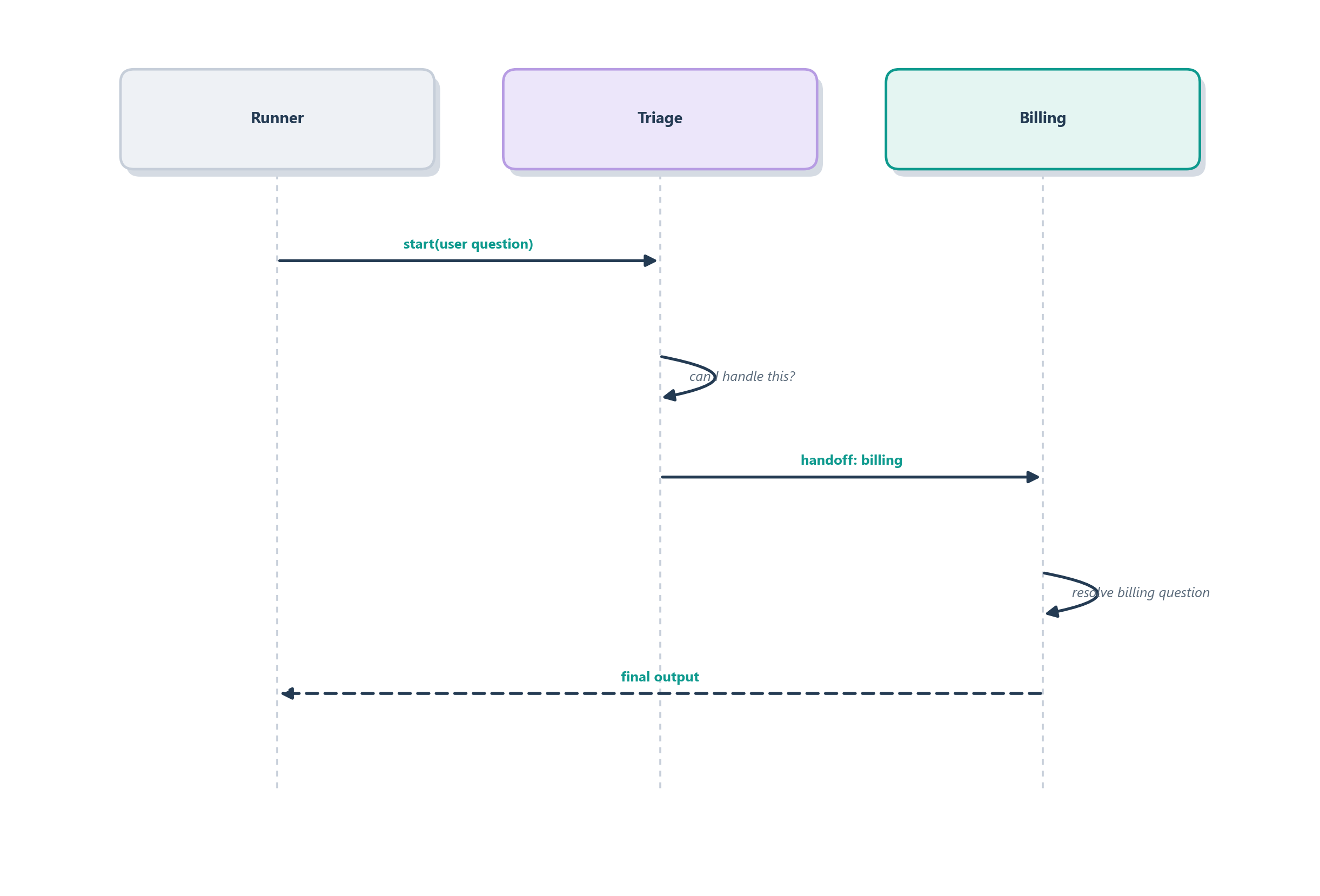
Trace what the runner does with that last line and every primitive from this chapter shows up. It starts the loop on the triage agent, which reads “I was charged twice” and decides this is a billing matter, so it performs a handoff: control passes to the Billing agent, which now owns the conversation and produces the answer that lands in result.final_output. This is a handoff, not an agent-as-tool call: triage steps out of the way and billing owns the reply, exactly the left-hand pattern of Figure 13.4. Figure 13.5 follows that path as a sequence. Nowhere did we draw an edge or write a routing function; the triage agent’s instructions plus its handoffs list were enough, and the runner discovered the rest at run time.
To make this production-ready you would add the pieces we named but did not need for the happy path, and each one is a contract rather than a code rewrite. An input guardrail on the triage agent rejects abuse or off-topic requests before they reach a specialist. A tool guardrail on a state-changing action like issue_refund blocks it unless eligibility and approval have already been checked, so a persuasive customer cannot talk the model into a refund the rules forbid. A session lets a follow-up message remember the earlier turn, and tracing left on lets you replay any conversation that went wrong to see which agent classified it, which handoff fired, and which guardrail stopped it. Each of those is a small addition rather than a restructuring, which is exactly the lightness the SDK promises, as long as the contracts behind each one are precise. But notice the shape of what we just built: several agents, each a specialist, cooperating to answer one request. Stretch that idea by adding more agents, richer patterns of delegation, agents that debate or check each other, and you arrive at the central question of the next chapter, multi-agent systems.
13.6 Summary
This chapter met a framework built on the opposite instinct from LangGraph: instead of drawing the whole state machine, you configure a few agents and let plain Python and a managed runner do the wiring.
- The OpenAI Agents SDK trades control for lightness. Where LangGraph makes you declare every node and edge, the SDK gives you a tiny vocabulary and lets the runtime discover the path at run time [1].
- Three primitives cover most of the surface: an agent (a model with instructions and tools), a handoff (one agent delegating to a better-suited one), and a guardrail (a fast input/output check that can stop a bad run early). The runner drives the think–act loop that ties them together.
- It sits on the Responses API. That layer carries state and exposes hosted tools (web search, file search, computer use) and you can call it directly, owning the loop yourself, when a task is too small to need the framework.
- Pick the lowest layer that gives enough control. The raw Responses API, the Agents SDK, and LangGraph form a ladder: use the bare API for one-shot work, the SDK for lightweight code-first agents, and LangGraph when you truly need an explicit graph [1].
- Lightweight does not mean loose. The SDK removes orchestration surface area, not design responsibility; the discipline moves from the graph you draw into four contracts, on each agent, tool, handoff, and guardrail [2].
- A handoff is not an agent-as-tool. A handoff transfers control and the specialist owns the answer; an agent-as-tool is a bounded consultation and the caller keeps ownership. Naming which one you mean keeps a team of specialists accountable [2].
- Guardrails are checks, not prompts. A prompt asks the model to behave; a guardrail enforces it whether the model cooperates or not, and belongs to whatever is too risky to leave to goodwill.
- Sessions and tracing come with the runtime. Memory across turns and a replayable log of every model call, tool call, and handoff are switches rather than sub-projects.
- A triage-and-handoff office is the smallest multi-agent system. A router that delegates to specialists shows every primitive cooperating, and points straight at the next chapter.
We have now built single agents two ways, the explicit graph and the lightweight kit, and in the worked example we quietly crossed a line: we used more than one agent to answer a single request. That raises a new and richer set of questions. When is a team of agents actually better than one? How should they be organized: as a manager with workers, as equals that debate, as a pipeline? And what new failure modes appear when agents talk to each other? Those are the questions of Chapter 14.
13.7 Exercises
- Name the parts. Map each of the four SDK pieces (agent, handoff, guardrail, runner) onto the small-office analogy (employee, pass-along rule, quality check, office manager) in your own words.
- Pick the layer. For each of these tasks, say whether you would reach for the bare Responses API, the Agents SDK, or LangGraph, and justify it in terms of what each layer manages for you: (a) summarizing a pasted document with one web-search tool; (b) a support desk that routes to three specialists and remembers the conversation; (c) a loan-approval workflow that must pause for human sign-off, resume later, and be auditable step by step.
- Prompt or guardrail? For Ledgerly’s refund agent, classify each rule as something you would put in the prompt or enforce with a guardrail, and explain why: “be polite,” “never refund above $500 without approval,” “answer in the customer’s language,” “never reveal another customer’s account number.”
- Handoff versus agent-as-tool. The SDK lets one agent involve another either as a handoff (control transfers) or as a tool (the caller stays in charge). Give a Ledgerly situation that suits each, and explain the difference in who owns the final answer.
- Write a contract. Pick one tool a Ledgerly agent might use (say
issue_refund) and write its four-part contract from Table 13.2: what it does, its arguments, its side effects, and when the agent must not call it. - Extend the office. Add a third specialist to the triage example and describe, without writing the graph, how the runner would route a mixed billing-and-technical message to the right place.