1 What Is an Agent?
“Knowing is not enough; we must apply. Willing is not enough; we must do.”
— Johann Wolfgang von Goethe
After this chapter you will be able to define an agent precisely, distinguish an agent from a fixed workflow, and place any system on the spectrum from tool to autonomous agent.
1.1 Opening intuition
It’s Wednesday, and you want a nice dinner out on Friday. You have two assistants you could hand this to, and watching how each one works tells you almost everything you need to know about agents.
The first assistant works from a script that someone wrote in advance, step by step: search a restaurant listing, sort by rating, pick the top result, call the booking line, read back the confirmation. When the world matches the script, it is wonderful — fast, tireless, and utterly predictable. But the script has no room to improvise. The moment something unexpected happens — the top restaurant is fully booked, or the listing comes back in a slightly different format — the assistant stops cold. It was never told what to do next, because whoever wrote the script didn’t foresee this exact situation.
The second assistant is handed the same goal — “book me a good dinner for Friday” — but no script. So it makes its own. It searches, sees that its first choice is full, and instead of giving up it thinks: “They mentioned last month that they loved that little Italian place — let me look for something similar.” It searches again, finds a well-reviewed trattoria, checks that Friday at 7 p.m. is open, books it, and sends you a note. It only interrupts you once — to ask whether 8 p.m. is okay, because 7 was taken. Nobody wrote down that sequence of steps. The assistant chose them, one at a time, reacting to what it found along the way.
That single difference — who decides the steps — is the whole idea behind an agent. The first assistant runs a workflow: a human decided the path, and the machine walks it. The second is an agent: you gave it a goal, and it decided the path itself [1].
Hold on to that dinner story. Almost everything in this book is a variation on it — what the second assistant “searched” (tools), how it “remembered” your love of Italian food (memory), how it decided what to do next (planning), and how it knew when to stop and hand back a reservation (termination).
1.2 The classical definition
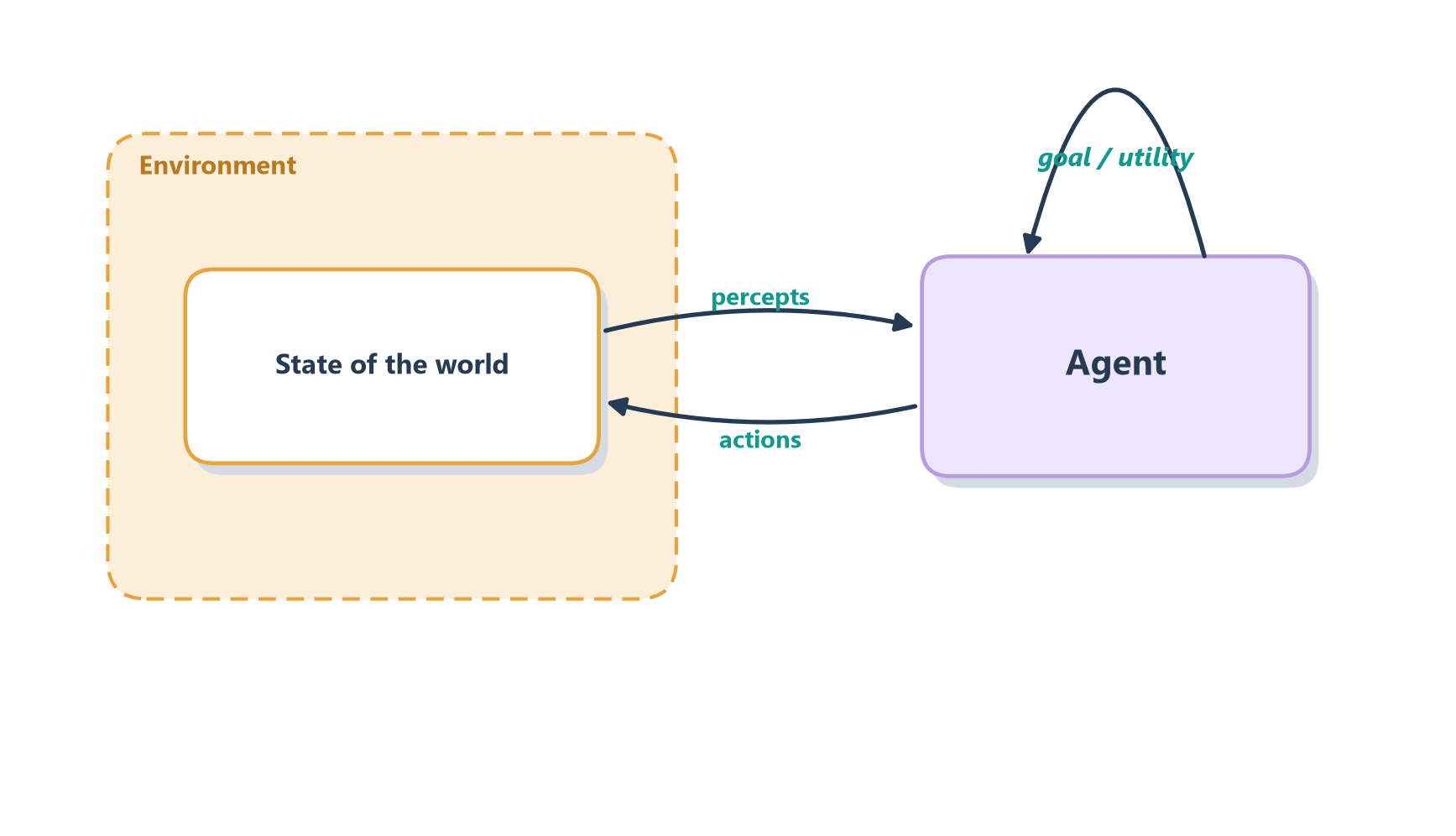
Long before large language models, AI researchers gave agent a careful definition. An agent is anything that perceives its environment through sensors and acts upon that environment through actuators in pursuit of a goal [2].
That still sounds a little abstract, so let’s make it concrete.
Consider a thermostat. It doesn’t understand what a room is, why people get cold, or even what winter means. All it knows is the current temperature and the temperature it’s trying to maintain. If the room gets too cold, it turns the heater on. If the room gets too warm, it turns the heater off. Despite its simplicity, it has all the ingredients of an agent: a sensor to observe the world, an actuator to affect it, and a goal to guide its actions.
Now think about a dog chasing a frisbee. The same basic pattern is at work, but the problem is much harder. The dog uses its eyes and ears to track the frisbee’s movement, constantly adjusting its path as the frisbee sails through the air. It isn’t just reacting to where the frisbee is right now — it is anticipating where it will be a few moments from now. Its legs provide the means to act, while the goal is simple: catch the frisbee before it hits the ground.
A self-driving car follows the same recipe at a much larger scale. Its sensors include cameras, radar, and other instruments that help it understand its surroundings. Its actuators are the steering wheel, accelerator, and brakes. Its goal is to transport passengers safely and efficiently. To do that, it must continuously observe the road, predict what other drivers might do next, evaluate its options, and choose the best action.
At first glance, a thermostat, a dog, and a self-driving car seem to have little in common. Yet all three are doing the same fundamental thing: they are perceiving the world, making decisions, and taking actions in pursuit of a goal.
And then there’s you. As you read this page, your eyes are gathering information, your mind is interpreting it, and you’re deciding whether these ideas are worth your attention. You may even be weighing whether to keep going or skip ahead to the next chapter. In that sense, you’re an agent too. The difference isn’t in the pattern itself — it’s in the richness of your perception, the sophistication of your reasoning, and the complexity of the goals you can pursue.
Strip away the details and every one of these fits the same simple picture, drawn in Figure 1.1: sense the world, act on the world, and repeat, all in service of a goal.
Two ideas from this tradition will stay useful throughout the book:
- Rationality. A rational agent picks the action it expects will get it closest to its goal, given what it has seen and what it knows [2]. The key phrase is “given what it knows.” A rational agent is not one that always succeeds — the frisbee can gust out of reach — but one that makes a sensible choice with the information it has. Being rational is about playing your hand well, not about being dealt a perfect hand.
- The agent loop. Perceive, decide, act, then perceive again to see what changed. Every agent, from the thermostat to the self-driving car to the LLM agents in this book, runs some version of this sense–plan–act loop.
The agent framing organizes much of AI. Wooldridge and Jennings characterized intelligent agents by autonomy, reactivity, pro-activeness, and social ability [3]. The Belief–Desire–Intention (BDI) model formalized how an agent balances what it believes, what it wants, and what it has committed to doing [4]. Reinforcement learning studies agents that learn a policy by maximizing cumulative reward [5]. Modern LLM agents borrow vocabulary and intuitions from all three.
1.3 The modern definition
Today, when practitioners say “agent,” they usually mean something more specific: a system where a large language model dynamically directs its own process and tool use to accomplish a task, keeping control over how it gets there [1]. OpenAI frames agents the same way, as “systems that independently accomplish tasks on behalf of users” [6].
Here is what that looks like in motion. Suppose you tell an LLM agent, “Find out why our checkout page got slower last week.” Notice what you did not give it: a procedure. You didn’t say “first open the dashboard, then look at Tuesday, then check the deploys.” You just handed over the goal and trusted it to figure out the rest. And that is exactly what it does. It has no script, so it reasons its way forward one step at a time.
It begins by querying the monitoring dashboard, because that’s where evidence of a slowdown would live. Reading the numbers, it notices that response times jumped on Tuesday — a clue, not an answer. So it asks the natural next question: what changed on Tuesday? It pulls the list of code changes deployed that day, scans them, and spots a new database query that looks suspicious. To be sure, it opens the relevant code and reads it. Now it can see the problem clearly: the query is scanning the whole table because it’s missing an index. It reports back with that diagnosis. The crucial thing to notice is that at every step it looked at what it had just learned and used that to decide the next move — dashboard led to Tuesday, Tuesday led to the deploy list, the deploy list led to the code. This is exactly our second dinner assistant from the opening, just working in a world of dashboards and code instead of restaurants.
Notice this is the same idea as the classical definition, only dressed in modern clothes. The mapping is almost one-to-one:
| Classical concept | Modern LLM-agent realization |
|---|---|
| Sensors (percepts) | The prompt, tool results, retrieved documents, memory |
| Actuators (actions) | Tool/function calls, code execution, messages it sends |
| Decision procedure | The LLM “thinking” over everything in its context |
| Performance measure | Task success criteria, offline evaluations, human ratings |
| The agent loop | “The LLM calls tools based on feedback, in a loop” |
The performance measure is deliberately external: it is how the world (an evaluator, a test suite, a customer) grades the outcome. Training-time signals like RL reward functions are a related but different idea; they shape the policy inside the model, and we will meet them in Section 5.5.4.
Boil it all down and an LLM agent is an LLM that calls tools in a loop, using the results to decide what to do next [1]. That one sentence is deceptively simple, and most of this book is about unpacking it: which tools to give it, what it should remember, how it should plan, when it should stop, and how much to trust the answer.
This framing is not just Anthropic’s. A broad survey of the field organizes every LLM agent into three parts — a brain (the model that reasons and decides), perception (how it takes in information), and action (how it affects the world) [7]. That is the classical sense–decide–act loop again, wearing yet another set of labels. Different researchers, same skeleton — a good sign the skeleton is real.
1.4 Agent vs. workflow: the key distinction
If you remember one distinction from this chapter, make it this one — it is the most useful idea for building real systems [1]:
- A workflow runs LLMs and tools along predefined code paths. You, the developer, laid down the track in advance, and the system rides it.
- An agent hands the steering wheel to the model: it decides which steps to take, which tools to call, and when the job is finished.
Here is an everyday way to feel the difference. A workflow is like following turn-by-turn GPS directions written down on a sticky note: “left on Main, right on 5th, straight for two miles.” As long as the roads match the note, it’s precise, effortless, and easy to trust — you don’t even have to think. But the note has no understanding of why those are the directions. The moment a road is closed for construction, the sticky note is useless; it has no idea what to do, because whoever wrote it never imagined this detour. An agent is like a local cab driver who actually knows the city. You give them only the destination, and they work out the route themselves. When they hit that same closed road, they don’t freeze — they mutter something, turn down a side street they know, and still get you there. The sticky note is the thing you’d rather trust on a familiar route where nothing ever goes wrong; the driver is who you want the instant something does. That is the whole trade-off between a workflow and an agent, in miniature (Figure 1.2).
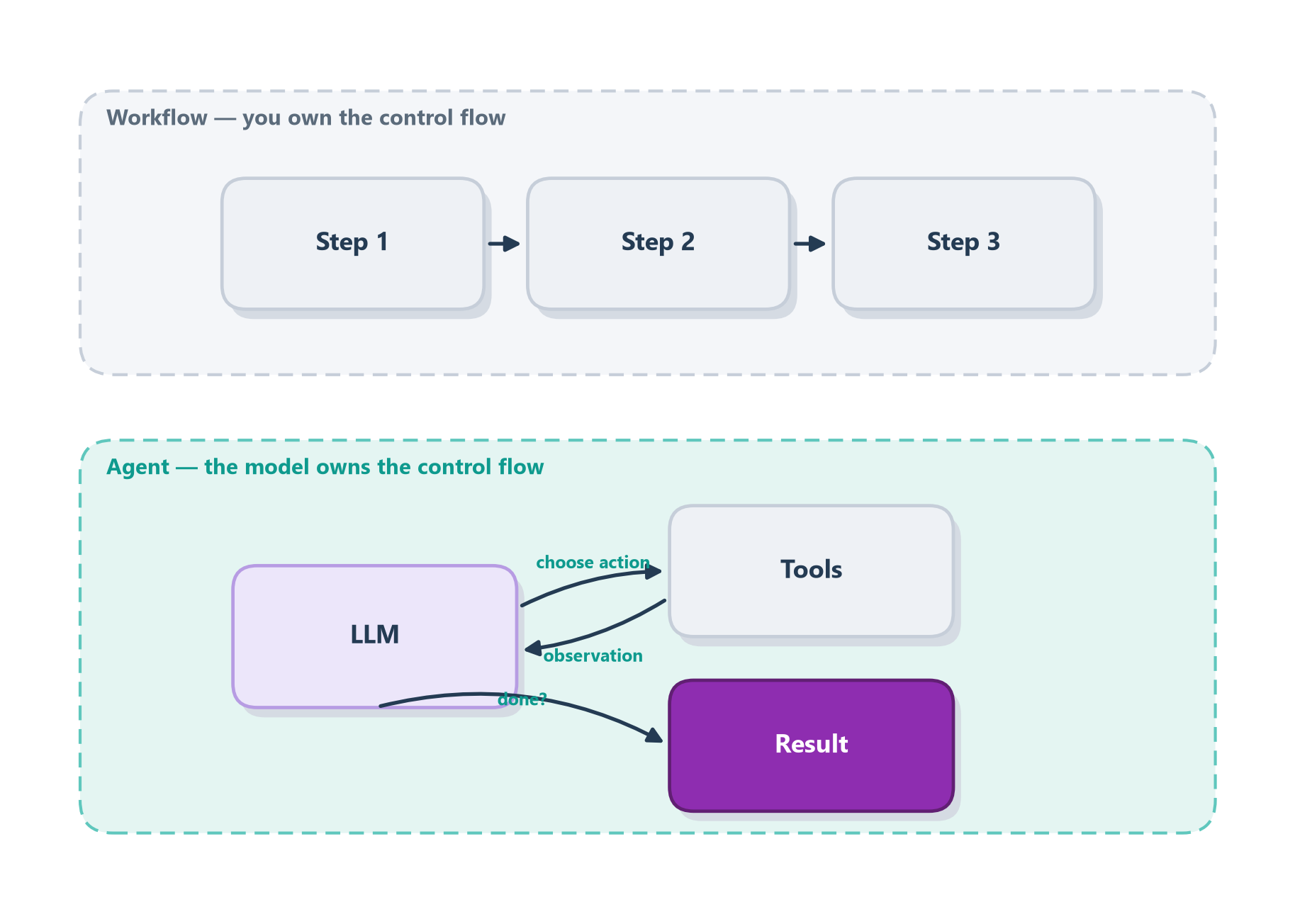
Neither is “better” — they are tools for different jobs. Workflows give you predictability and consistency for well-defined tasks; agents give you flexibility for open-ended ones, but you pay for it in higher latency, more tokens, and the risk that a small early mistake snowballs into a wrong answer [1]. That leads to a piece of advice worth taking to heart now, before you build anything:
Start with the simplest thing that works. Add agentic autonomy only when a simpler workflow — or even a single well-crafted LLM call — demonstrably falls short [1].
Many production “agents” are mostly workflows with one or two agentic steps. That is a feature, not a failure. Reserve full autonomy for the parts of the problem where you genuinely cannot predict the steps in advance.
1.5 The spectrum of autonomy
In real life, “workflow” and “agent” are not two boxes but the two ends of a dial. Most systems live somewhere in the middle. Figure 1.3 lays out the dial, from a plain model call on the left to a fully autonomous agent on the right.
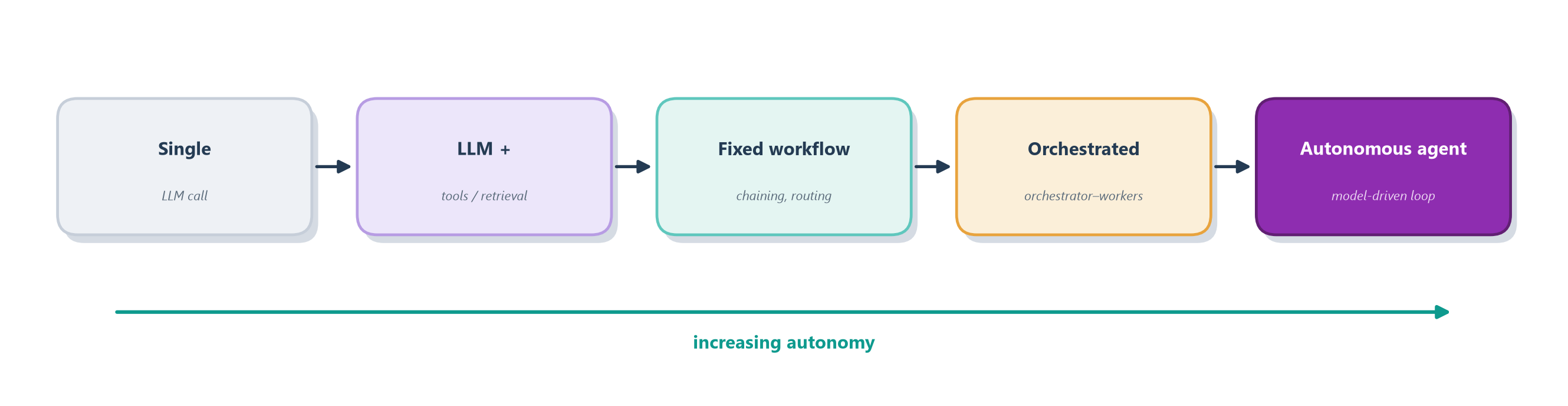
It helps to have a concrete example for each notch on the dial, because the jump from one to the next is really a jump in how much the model — rather than you — gets to decide:
- Single LLM call — “Summarize this email.” One question goes in, one answer comes out. There are no tools and no loop; the model reads and responds, and that is the entire interaction. This is where the vast majority of useful LLM work actually lives.
- LLM + tools/retrieval — “Answer this using our help-desk articles.” Now the model first looks something up — it fetches the relevant articles — and only then answers. That’s one extra step, but notice the model still isn’t making any real choices about how to proceed; the shape is fixed at “retrieve, then answer.”
- Fixed workflow — “Translate the ticket, classify its urgency, then route it.” Three set steps, run in a fixed order that you designed. The model does the work inside each step, but it never decides what the steps are or what order they come in — you did that in advance.
- Orchestrated workflow — “Research this topic.” A coordinator LLM splits the job into chunks, hands each chunk to a worker, and stitches the results back together. The overall shape is still yours, but you’ve started letting the model fill in the pieces — how many workers, and what each one focuses on.
- Autonomous agent — “Fix this failing test.” Now the model decides what to read, what to change, whether its change worked, and when the job is finished. Nobody knows the sequence of steps in advance — not you, and not even the model — until it takes them, one observation at a time.
As you slide right along Figure 1.3, you trade away predictability, low cost, and speed in exchange for flexibility and reach. The real engineering skill is not building the most autonomous system you can. It is choosing the least autonomy that still solves your problem reliably.
1.6 Inside the loop
Strip away the frameworks and an agent is astonishingly simple: an LLM calling tools in a loop until it decides it is done. Figure 1.4 shows the whole mechanism, and the easiest way to feel it is to picture a chef cooking without a recipe.
Imagine that chef is handed a goal — “make a good tomato sauce” — rather than a list of measured steps. So they start, and then they taste. The sauce is a little flat, so they add a pinch of salt and stir it in. They taste again: better, but now it’s missing something bright, so they add a squeeze of lemon and a little basil. They taste a third time. Still a touch too sharp, so in goes a small spoon of sugar to round it off. Taste once more — and this time it’s right, so they stop. Nobody wrote down “add exactly one pinch of salt, then a squeeze of lemon”; the chef discovered each step by tasting what they had so far and deciding what it needed next.
That tasting-and-adjusting cycle is exactly what an agent does. Each time the chef tastes the sauce, they are gathering an observation about the current state of the world; each pinch of salt or squeeze of lemon is an action that changes it; and the decision to keep going or to stop is the agent judging whether the goal has been met. The agent’s “taste,” in other words, is the observation it gets back from each tool call — and just like the chef, it uses that feedback to decide its very next move.
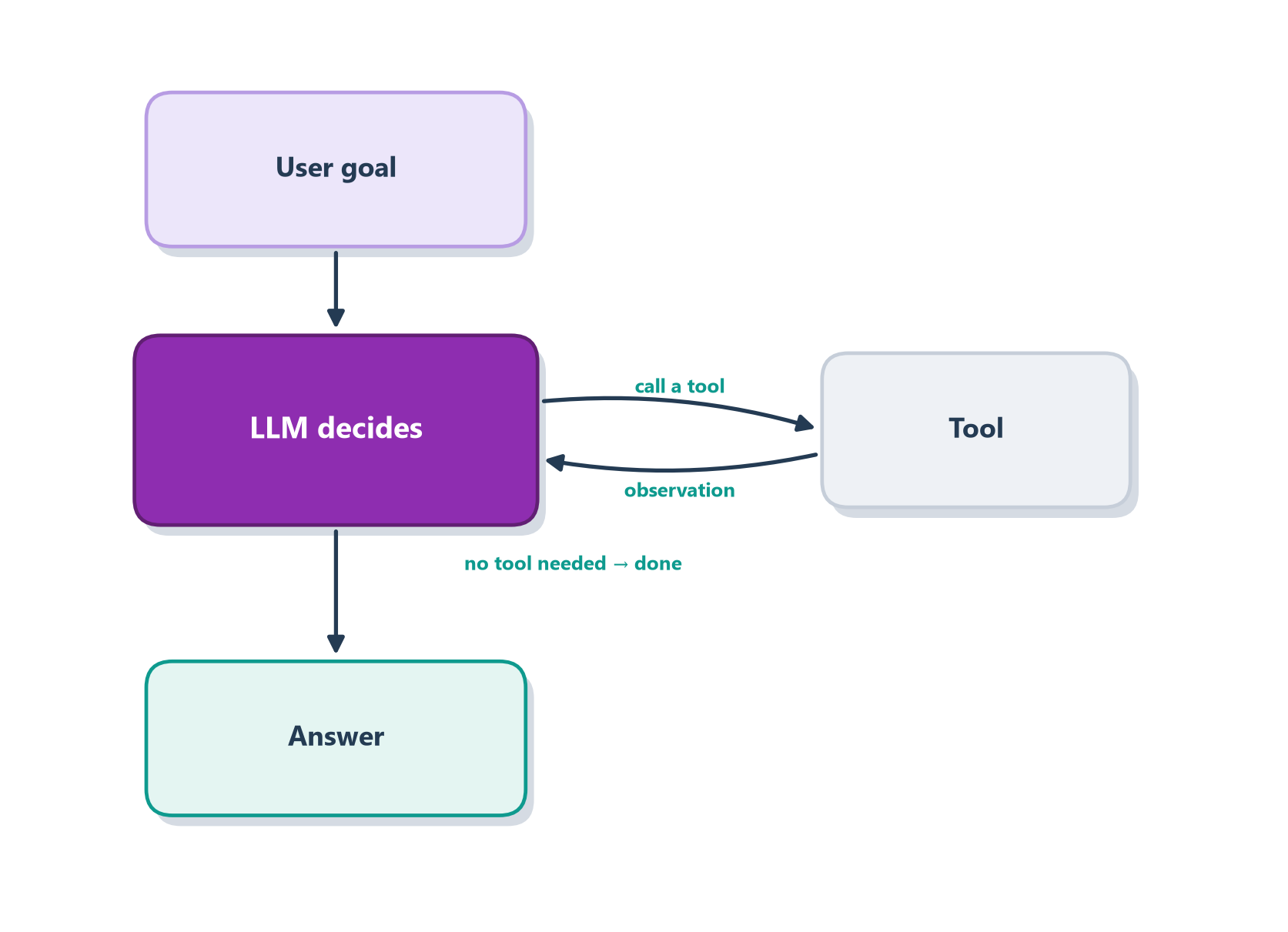
Walk through Figure 1.4 with the question “What is 23 × 19, and is it more than 400?”:
- The model reads the goal and decides it needs arithmetic, so it asks to call a
calculatortool with23 * 19. - The tool runs and returns the observation
437. - The model sees
437, notices that is greater than400, decides no more tools are needed, and returns the final answer.
That is the entire idea. Expressed as a few lines of pseudocode, the loop is:
messages = [user_goal]
repeat up to N times:            # N is the stop condition
    reply = LLM(messages, tools)
    if reply has no tool call:   # the model decided it is done
        return reply
    result = run(reply.tool_call)
    messages += [reply, result]  # feed the observation back in
Everything else in this book — memory, planning, multi-agent orchestration, guardrails — is an elaboration of three ideas in that sketch: the loop, the tool call, and the stop condition. Notice the loop already needs a stop condition (up to N times); giving an autonomous system a reliable way to terminate is a core safety concern, not an afterthought [1].
When you use a coding assistant that reads files, runs tests, and edits code until the tests pass, you are watching exactly this loop — just with richer tools than a calculator. We build a real, runnable version in Part III; here the point is only to see the shape of an agent clearly.
1.7 When not to build an agent
Autonomy is powerful, but it is never free, so it is worth spending deliberately. There are four situations in particular where a simpler design almost always wins, and it’s worth walking through each one.
The first is when the steps are known and stable. If you can already write down the sequence the system should follow, then writing it down as a workflow will give you something more predictable than an agent — and predictability is a feature, not a limitation, when the path never changes. The second is when latency or cost budgets are tight. Every turn an agent takes is another call to the model, and those calls add up in both time and money; a design that reaches the answer in one step will always be cheaper than one that reasons its way there over five. The third is when errors are expensive and hard to reverse. An autonomous agent compounds its own mistakes — a wrong turn early on shapes everything it does next — so in a setting where a bad action can’t easily be undone, the freedom to improvise becomes a liability rather than an asset. And the fourth, simplest of all, is when a single retrieval-augmented LLM call already clears the bar [1]. If one well-crafted prompt with the right context does the job, there is nothing to be gained by wrapping a loop around it.
A quick example makes the temptation concrete. Say you want to turn incoming support emails into structured tickets. It is tempting to reach for a clever agent that “figures it out.” But the steps never change: extract the sender, classify the issue, set a priority, create the ticket. That is a workflow. Write it as four plain steps and it will be faster, cheaper, and easier to debug than any agent. Now change the task to "investigate why this particular customer keeps getting billed twice." Suddenly nobody can enumerate the steps in advance; it depends entirely on what you find as you dig. That is where an agent earns its keep.
So reach for an agent when the task is genuinely open-ended, you cannot list the steps ahead of time, and you can operate in a reasonably trusted, observable, and reversible environment.
When a simple agent is the right call, the teams who build the best ones follow three principles: keep the design simple, make the agent’s thinking transparent (show its planning steps), and invest heavily in the agent–computer interface (ACI) — the tools and their documentation [1]. The last point surprises people: Anthropic reports spending more time refining how tools were described to the model than on the main prompt. Just as good human–computer interfaces make software usable, good agent–computer interfaces make an agent reliable. We return to the ACI in depth in Part III.
1.8 Case study: the Ledgerly support agent
Throughout this book we will build one system together, returning to it near the end of most chapters so you can watch it grow from a single idea into a running, production system. Meet Ledgerly, a fictional company that sells subscription billing software. Like every such company, Ledgerly drowns in support requests: “Why was I charged twice?”, “Cancel my plan”, “I need a refund for last month”, “Which invoice is this line item on?”. Our job, across the coming chapters, is to build the support agent that handles them, and to make every design decision the way a real team would.
The very first question is the one this chapter has been circling: is this a job for a workflow or an agent? The honest answer is both, and knowing which part is which is the whole art. Look at the incoming mail and two kinds of request separate out. Some are utterly routine. “Email me a copy of invoice #4471” has one correct procedure every single time, so it is a workflow in the sense of Section 1.4, and wrapping a reasoning loop around it would only add latency and risk. Others are genuinely open-ended. “I have been billed twice for three months and I think it started when I switched plans” is exactly the investigate why this customer keeps getting billed twice problem from Section 1.7, where nobody can write the steps down in advance because they depend on what you find as you dig. That request wants an agent.
So Ledgerly’s support system will be a hybrid, and that is the norm rather than a compromise. Most tickets flow down predictable, auditable workflows, and only the messy minority escalate to an agent that can plan, look things up, and decide what to do next. Choosing the least autonomy that reliably solves each request, the spectrum idea from Section 1.5, is the design principle we will apply again and again as the system grows.
In Section 4.6 we give this fuzzy idea a precise specification, defining exactly what the agent senses, what it can do, and what “good” even means for it.
1.9 Summary
- An agent perceives an environment and acts on it to pursue a goal; this classical definition still frames modern systems [2].
- A modern LLM agent is an LLM that dynamically directs its own tool use in a loop, based on feedback from the environment [1].
- The key practical distinction is workflow (you own the control flow) vs. agent (the model owns it).
- Think in terms of a spectrum of autonomy; choose the least autonomy that reliably solves the problem.
- Every agent needs a stop condition — termination is a safety requirement.
Where next? This chapter defined what an agent is. But the idea did not appear overnight — planning, reacting, and learning were each worked out decades ago. In Chapter 2 we trace that lineage, because every way a modern agent can fail has a named ancestor.
1.10 Exercises
- Take a task you would like to automate and classify it: single call, workflow, or agent? Justify your choice using the trade-offs in Section 1.4.
- Redraw Figure 1.4 for a coding assistant. What are its tools, its observations, and its stop condition?
- Describe one failure mode a “max steps” stop condition prevents, and one it does not. What additional guardrail would you add?